

It’s amazing what you find once you begin cleaning a really messy room. As you pick through overfl owing drawers, drag piles of stuff out of the closet and corners, and dig under furniture, you discover all kinds of stuff that you’d either lost or forgotten about.
“Oh, hey, I bought this pair of boots years ago! How long have they been stuff ed in the back of the closet? And, wow, look at this old photo album from college! It must have fallen behind my desk when I first moved into this house.Hey, here’s a bunch of old paperwork in a folder. I wonder if any of these papers are important? Whoa, a twenty-dollar bill behind this lamp!”
Cleaning and organizing a big mess is a chore, but it’s exciting to discover just how much you’ve got tucked away. You might come across some real treasures.
“Whoa, look at this vintage leather wallet that belonged to my grandfather. I forgot I put it in this drawer. And here’s a bunch of T-shirts that I thought were lost.”
The experience is similar when you start putting together your library of slides. The sheer amount of content that is available on computers across your network might shock you. As the VP of sales at Brighthouse Networks put it, “We found slides we never knew we had.”
Of course, there’s a right way and a wrong way to clean a room.The wrong way would be to rush through it, toss a bunch of stuff in boxes, and sweep the rest under the rug. The right way means taking your time, bringing everything together, and imposing some organization going forward. As Ben Franklin said, “A place for everything, everything in its place.”
So, if you have to attend a friend’s wedding this weekend, you now know exactly where your best suit is located in the closet. If you want to show a visiting relative that vintage wallet, you now know it’s in the top drawer of your dresser.If you need to quickly grab some athletic clothes for a tennis match, you know right where to go. You know exactly where to go to find whatever you need, and everything is clean, organized, and ready to go.
That was what Brighthouse did when they created their slide library. They didn’t just throw a bunch offiles into a shared folder like they were tossing junk into a bucket.Instead, they took the time to create a structure for their overarching company story, and then made sure that there was a subdivision in their library for each chapter of that story, with separate sections for each region, show, audience, and time slot.
The logical structure meant that when a team member logs into their slide library, they are following a story. And within that story, they are choosing slides that are best suited for their meeting. They can pick the slides (i.e., scenes) for their own presentation, with each scene curated to move the story along. This kind of discipline in Presentation Management on the front end saves an incredible amount of time and empowers your entire team going forward in an amazing way.
You have so many assets throughout your organization, far more perhaps than you realize, with tons of relevant content parked in folders on networks, cloud storage, computers, and flash drives all over the place: case studies, product descriptions, infographics, quarterly reports, org charts, company history, messages from the CEO, videos, memes, social posts, and more. All you have to do is collect them, bring them together, and impose some structure on them.
As you begin the process of bringing all of your files together, you’re going to be surprised at what you discover.
“Oh, hey, look at this marketing material I found in this folder. It’s from last year, but it’s still relevant. And here’s a sales video from that conference in February. I’ve been wondering where it went. And the graphic on this flash drive is incredible. I didn’t realize marketing had made it. It perfectly illustrates our onboarding process. Clients would love it. Wow, there’s so much good stuff in here. I didn’t know we had all of this content!”
That’s the kind of thing we hear frequently when helping people build their slide libraries.
Start Dealing With The Mess
The first stage in creating your slide library is to find the everyday files that are located all over your network. If you’re like most companies, you have a lot more relevant content buried in folders all over the place than you can possibly imagine. Think about all of the PowerPoint slide decks from past presentations that have been saved and forgotten, or the numerous pictures and videos that are just sitting in cloud storage waiting to be reused, not to mention charts, graphs, statistics, articles, case studies, white papers, and more.
The next stage is to weed through all of that content you’ve brought together to find the very best, weed out the duplicates, and then organize and make them available to your people for everyday use through a centralized library.
If you’ll pardon an unusual metaphor, imagine you’re driving along a back road in Florida and you see a bunch of oranges growing on trees in a large grove beside the road.What is the journey from those oranges on the tree to the delicious glass of orange juice sitting on the table in front of you for breakfast in the morning?
In other words, how do those oranges become everyday fruit for everyday use? It’s a process, and until the owner of that grove takes the oranges through that process, you can’t readily consume the juice in the morning.
What if every time you wanted a glass of orange juice with your breakfast, you had to get in your car, drive out to the orange grove, pick a crate of oranges by yourself, then bring them all back to your house and squeeze the juice out of them one at a time? It might be fun to do it once, but over and over again? Every morning? Think about all of the inefficiency and wasted time. If that was the only way to enjoy orange juice, you’d probably just give up on it.
But what if there was a process for harvesting all of those oranges, squeezing the juice out of them, bottling that juice, and delivering it to your house so you always had some on hand? Of course, that’s exactly what orange juice companies do, and that’s what Presentation Management does as well.
There’s fruit hanging in folders all over your company, and your first step is to pluck all of that fruit and bring it together in one place. The next step is to process all of that fruit into an easily consumable form—like metaphorical bottles of juice—so everyone can consume it when they want. It’s tedious work on the front end that saves your entire organization a whole lot more work in the future.
In terms of your slides, you’re going to meticulously track down all of the content throughout your entire organization and bring it all together, organizing it using some kind of content management system that gives it thematic structure and makes it accessible for your people when they need it.
43 You probably already use a few content management systems to store and organize files, such as Dropbox, SharePoint, and the Windows file system. Now, you’re going to do something similar with all of your presentation content. The only difference is that all of the files you bring together will be formatted specifically as slides that are ready to present.
That way, all of your marketing and sales content is ready to be used, reused, and repurposed. So if you have a Power-Point presentation with twenty-two slides, every one of those individual slides will become a separate piece of content that can be stored, managed, updated, and reused— on demand—right from your slide library.
All of your stored content becomes productive content, so you no longer have to go “hunting and gathering” through folders looking for individual pieces that you can splice together into a new slide deck. No longer will a useful file go dormant in some forgotten place once you’ve used it.
Imagine if you asked a question on Google, and instead of giving you a bunch of links to webpages that might contain the answer, it provided you with a slide that directly answered your question using text and media. That’s the power of Presentation Management, and it’s practically a whole new medium of communication.
ORGANIZING YOUR TANGLED
MESS OF SLIDES
As we said, when you start going through all of your folders and gathering up content for your slide library, you’re going to be amazed at the sheer amount of reusable and relevant files you already possess: videos you’d forgotten about, old slide presentations that were never used again, 46 pictures you thought you’d lost, graphs and charts you’ve never seen before.
The VP of sales at Brighthouse described this process as “striking gold in our own backyard.”
She discovered that they had a vast treasure trove of productive files at their fingertips. Think about how this is going to boost productivity. Think about how much more effectively and consistently people throughout your organization will be able to communicate in their presentations. Think about how powerful it’s going to be when every single employee can respond to any customer question or concern within seconds using content that is already formatted and ready to present.
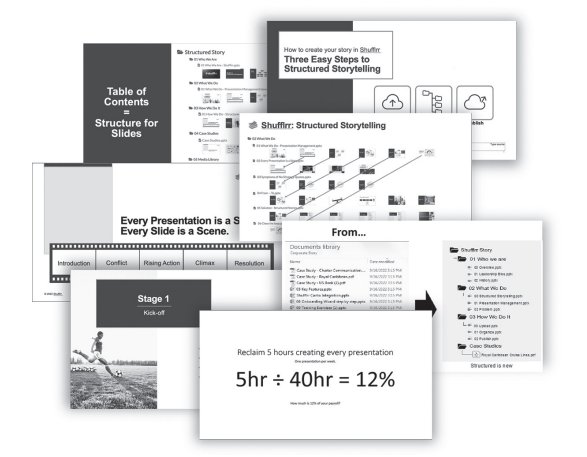
Once all of your content is organized into a slide library, you’re ready to transform it into a story: the story of your company. When every presentation becomes a story, and every slide becomes a scene, we call that Structured Storytelling, and it’s going to radically improve the way you communicate the value of what you have to offer.
With Structured Storytelling, the average sales rep can create stories with impact that leave customers feeling moved, fulfilled, inspired—or whatever you want them to feel.