
ActionsQueue APIs
The Action Queue in Shufflrr is used for processing that generally takes a longer period of time and needs to be queued up for processing asynchronously. This is for items such as processing uploaded files, slide updating, applying permission changes to folders, etc.
Get Actions Queue
Actions Queue Dismiss
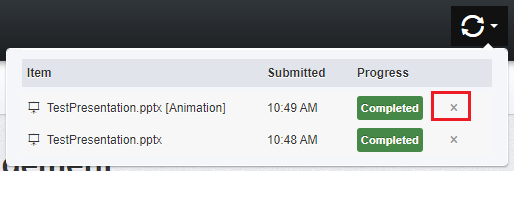
When an item is proceesed through the Actions Queue, the status of it will be shown in the Shufflrr UI for the user until the following day or the user decides to dismiss the message so from their queue display (by clicking on the x next to the record they no longer want seeing in the Actions Queue [refer to image below]). Use this API to dismiss the message for the user.
| Method type | POST |
| API Location | https://wwwapi.shufflrr.com/api/actionsqueue/Dismiss |
| Swagger documentation location | https://wwwapi.shufflrr.com/api/docs/ui/index#!/ActionsQueue/ActionsQueue_Dismiss |
Sample Request Body
{
"actionId": 0
}
Where 0 is the ID of the Actions Queue item to be dismissed
Sample Successful Response
0Sample Unsuccessful Response – No actionId sent
Value cannot be null.
Parameter name: target
Sample Unsuccessful Response – All other
{
"message": "Authorization has been denied for this request."
}