
Account APIs
Use the account APIs to login, request access, and request and perform password resets
Login
RequestPasswordReset
This API is used to trigger a password reset request email (if the email exists in the Shufflrr portal) to be sent to the provided email address. This API will always return 'True' and will not return any message to specify if an email address exists in Shufflrr or not. An email with the link for the user to reset their password will only be sent in the case of the specified user existing in the Shufflrr Portal.
This API needs to be called first when trying to do a password reset. The resetkey parameter that is sent in the password reset request email will need to be used in the PasswordReset API.
| Method type | POST |
| API Location | https://wwwapi.shufflrr.com/api/account/RequestPasswordReset |
| Swagger documentation location | https://wwwapi.shufflrr.com/api/docs/ui/index#!/Account/Account_RequestPasswordReset |
Sample Request Body
{
"emailAddress": "APIUser@shufflrr.com"
}
Sample Successful Response
true
Sample Password Reset Link
https://wwwapi.shufflrr.com/PasswordReset?resetkey=XXXXXXXXXXXXXXXXXXXXXXXXXXXXXXXX_XXXXXXXX-XXXX-XXXX-XXXX-XXXXXXXXXXXXWhere the value:
XXXXXXXXXXXXXXXXXXXXXXXXXXXXXXXX_XXXXXXXX-XXXX-XXXX-XXXX-XXXXXXXXXXXXin the above example link is the resetkey that would be used to perform a password reset.
ResetPassword
This API is used to set a new password for a specific user.
This API needs to use the resetkey that is associated with the RequestPasswordReset API call that was performed before this API is called. A resetkey can only be used once. Once it is used in a request to change the password a new resetkey from a new RequestPasswordReset API must be issues. Passwords need to be a minimum of 6 characters.
| Method type | POST |
| API Location | https://wwwapi.shufflrr.com/api/account/ResetPassword |
| Swagger documentation location | https://wwwapi.shufflrr.com/api/docs/ui/index#!/Account/Account_ResetPassword |
Sample Request Body
{
"passwordResetKey": "XXXXXXXXXXXXXXXXXXXXXXXXXXXXXXXX_XXXXXXXX-XXXX-XXXX-XXXX-XXXXXXXXXXXX",
"newPassword": "NewPassword"
}
Sample Successful Response
trueSample Failure Response – not valid resetkey
falseSample Failure Response – password criteria not met
Password does not meet minimum length of 6 characters
Parameter name: password
Actual value was .
RequestAccess
This API is used to request access to a Shufflrr portal for a specific user. This will create a user account in the Portal in a pending status (in the users admin it will show as ‘requesting access'). The admin of the portal will have the options to Grant Access (to turn into an actual account) or Deny Access (delete the requesting user account).


Submitting this API request will trigger an email to be sent to the portal admin to inform the admin that there is a pending user request.
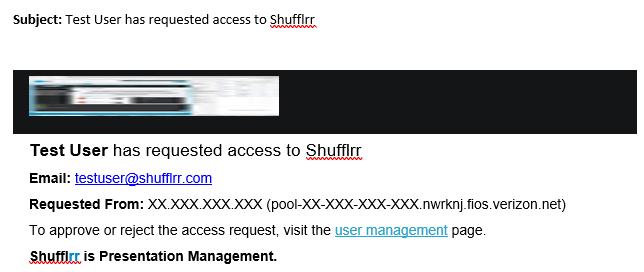
An email can only be associated to one account. If an existing email is sent in a failure response will be returned.
| Method type | POST |
| API Location | https://wwwapi.shufflrr.com/api/account/RequestAccess |
| Swagger documentation location | https://wwwapi.shufflrr.com/api/docs/ui/index#!/Account/Account_RequestAccess |
Sample Request Body
{
"emailAddress": "testuser@shufflrr.com",
"firstName": "Test",
"lastName": "User",
"password": "password"
}
Sample Successful Response
Response Code $$$$$$$$$$$$$$
200Response Body $$$$$$$$$$$$$
no contentSample Failure Response
Response Code $$$$$$$$$$$$$$
409Response Body $$$$$$$$$$$$$
no content