

Chapter 3: The Components of Enterprise
In the previous chapter, we outlined how a shift in mindset—from disposable decks to reusable assets—can radically improve efficiency, brand control, and productivity. But how do you operationalize that mindset inside a Microsoft 365 ecosystem using SharePoint and Shufflrr? This chapter breaks down the components necessary for implementing presentation management as a sustainable system.
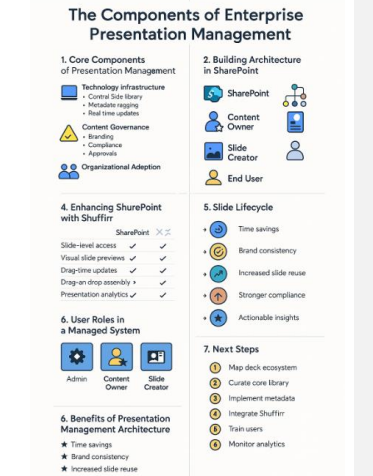
1. The Core Components of Presentation Management
Effective enterprise presentation management requires an interplay of three essential components:
A. Technology Infrastructure
This includes your core platforms—Microsoft 365 and SharePoint Online—augmented by Shufflrr, which provides presentation-specific management tools:
- Central slide library
- Metadata tagging and categorization
- User permissions and compliance workflows
- Real-time content updates
- Integration with PowerPoint, Teams, and Outlook
B. Content Governance
This ensures presentations are:
- On-brand
- Up-to-date
- Compliant with legal or regulatory standards
- Aligned with messaging strategies
Governance includes:
- Content owners (usually marketing)
- Editors and approvers
- Permissions and publishing workflows
C. Organizational Adoption
Technology and governance are meaningless without cultural adoption.To succeed, the system must be embraced by sales, marketing, HR, leadership, and compliance teams alike.
2. Building the Architecture in SharePoint
To begin managing presentations as assets, start with the right SharePoint architecture:
Slide-Centric Libraries
- Organize content by function: Sales Enablement, Product Training,Investor Relations, etc.
- Store decks in a modular format so slides can be easily surfaced,previewed, and reused.
Metadata Framework
- Create a taxonomy for slide tags: Topics, Department, Use Case,Compliance Level, Expiration Date.
- Use managed metadata columns in SharePoint to enforce consistency.
Version Control & Workflow
- Turn on version history for all libraries.
- Set up approval workflows using Power Automate or SharePoint’s built-in content approval.
3. Enhancing SharePoint with Shufflrr
| Feature | SharePoint | Shufflrr |
|---|---|---|
| Slide-level access | × | ✓ |
| Visual slide previews | × | ✓ |
| Real-time universal updates | × | ✓ |
| Insert deck building | × | ✓ |
| Presentation analytics | × | ✓ |
When integrated with SharePoint:
- Shufflrr uses the same authentication and storage backbone
- Files can be accessed from both SharePoint and directly in Shufflrr’s interface
- Presentation content becomes discoverable, measurable, and manageable
4. User Roles in a Managed System
To implement presentation management at scale, assign clear
responsibilities:
| Role | Description |
|---|---|
| Admin | Oversees platform access, integrations, and compliance enforcement |
| Content Owner | Usually marketing; manages messaging, branding, and taxonomy |
| Slide Creator | Designers, writers, and SMEs contributing slide assets |
| End User | Sales, HR, training, or executives building and presenting decks |
Each role needs training and clear expectations on how to use the system effectively.
5. Slide Lifecycle: From Creation to Impact
Every slide should follow a lifecycle:
- Create – SME or marketer authors a slide using branded templates
- Tag – Metadata is added in SharePoint or Shufflrr for discoverability
- Approve – Content is reviewed and published to the slide library
- Use – End users build presentations using Insert functionality
- Track – Analytics record how often the slide is used and by whom
- Update – Content owner edits the master slide when changes are needed
- Refresh – All decks using that slide are updated automatically
This process ensures content quality, governance, and continuous improvement.
6. Benefits of Presentation Management Architecture
When these components come together, your organization gains:
- Time savings through faster presentation assembly
- Brand consistency across all communication touchpoints
- Increased slide reuse and ROI on content investment
- Stronger compliance in regulated industries
- Actionable insights via slide-level analytics
7. Next Steps
To embed presentation management into your Microsoft 365 environment:
- Map your existing deck ecosystem.
- Curate a core library of reusable slide assets.
- Implement metadata standards.
- Integrate Shufflrr into your SharePoint environment.
- Train users and content owners.
- Monitor analytics and adjust strategy.
In the next chapter, we’ll explore how to curate and tag your slide content for maximum usability—including real-world examples of enterprise taxonomy and metadata models in action.
Use Case Study:
GlobalTech – Deploying Enterprise Presentation Management
Company Overview
Name: GlobalTech Solutions
Industry: Enterprise Software
Employees: 12,000 worldwide
Offices: North America, EMEA, APAC
Stack: Microsoft 365, SharePoint Online, Power BI, PowerPoint, Teams
Challenge: Inconsistent messaging, duplicated effort in presentation creation, compliance exposure
📍 Initial Situation
GlobalTech had thousands of presentation files stored in SharePoint, spread across dozens of team sites. Content duplication, out-of-date slides, and brand inconsistencies were common. Sales teams often modified marketing-approved slides, introducing errors or unauthorized claims.
A single enterprise sales pitch could take 6–8 hours to assemble.Compliance audits uncovered risk exposure due to outdated pricing and unsupported feature claims. Marketing and compliance teams had no visibility into what was being used or shared in the field.
🎯 Goals
- Create a single, centralized slide library with governance
- Ensure presentations are built from approved, compliant content
- Improve speed and consistency of deck creation
- Enable analytics to understand content usage across departments
Solution Components
1. Technology Infrastructure
- Integrated Shufflrr with SharePoint Online via Azure AD SSO
- Enabled slide-level access and searchability
- Connected with PowerPoint for native editing and presentation delivery
2. Governance Framework
- Appointed Marketing as content owners
- Defined Slide Creator roles in product and compliance teams
- Implemented approval workflows in SharePoint for content publishing
- Controlled access via SharePoint groups: View, Edit, Admin
3. Organizational Adoption
- Piloted with North American sales and marketing teams
- Hosted live training and asynchronous video tutorials
- Presented weekly usage reports to leadership to build momentum
Results After 6 Months
| Metric | Before Shufflrr | After Shufflrr |
|---|---|---|
| Avg. Deck Creation Time | 6–8 hours | 20–30 minutes |
| Brand Compliance | 62% | 98% |
| Slide Reuse Rate | <20% | 75% |
| Regulatory Incidents | 4 per year | 0 |
| Deck Quality Feedback | Mixed | 4.7/5 (Sales rating) |
Strategic Impact
- Sales: Greater productivity and confidence in messaging
- Marketing: Central control over brand and message delivery
- Compliance: Risk exposure significantly reduced
- Leadership: Consistent storytelling from top to bottom
Lessons Learned
- Early training is key—especially for end users
- Pilot programs help tailor metadata and permissions
- Leadership buy-in accelerates adoption and success
- Real-time updates build trust in the system’s accuracy
Client Success Story
Company: GlobalTech Solutions
Industry: Enterprise Software
Employees: 12,000 worldwide
Challenge GlobalTech’s sales and marketing teams were struggling with inefficient presentation workflows. PowerPoint files were scattered across SharePoint, resulting in duplicate content, inconsistent messaging, and frequent use of outdated slides. Building a custom sales presentation could take over six hours, and compliance audits uncovered regulatory risks due to inaccurate or unauthorized messaging.
Objectives
- Centralize presentation content into a governed library
- Reduce time spent building custom decks
- Ensure brand consistency and compliance
- Track content performance across the enterprise
The Solution
GlobalTech integrated Shufflrr into their Microsoft 365 + SharePoint environment to create a true Enterprise Presentation Management System.
Key Features Implemented:
- Slide-level access with metadata tagging
- Insert presentation builder
- Automated content updates
- Approval workflows via SharePoint
- Role-based permissions and access controls
How It Worked
- Marketing curated and tagged approved slide content.
- Product and Compliance teams contributed technical and legal messaging.
- Sales teams used Shufflrr’s intuitive interface to search for and assemble decks in under 30 minutes.
- Executives tracked usage and engagement through analytics dashboards .
Results
| Metric | Before | After |
|---|---|---|
| Deck Creation Time | 6–8 hours | 20–30 minutes |
| Brand Compliance | 62% | 98% |
| Slide Reuse | <20% | 75% |
| Regulatory Incidents | 4/year | 0 |
| Sales Team Satisfaction | Mixed | 4.7/5 |
Impact
- Faster Time to Market: Sales reps quickly tailored presentations for prospects.
- Improved Brand Integrity: Marketing retained control over message delivery.
- Zero Compliance Violations: Accurate, approved messaging used enterprise-wide.
- Cross-Functional Alignment: Teams worked from the same playbook.
Quote from the Client
“Shufflrr changed the way we work with presentations. What used to take a full day now takes minutes—and we know it’s always on-brand and compliant.”— VP of Sales Enablement, GlobalTech Solutions
Why It Matters
GlobalTech’s experience shows how integrating presentation management with Microsoft 365 and SharePoint doesn’t just save time— it transforms how companies tell their story. With the right architecture, governance, and tools, presentations become strategic assets, not one-off deliverables.