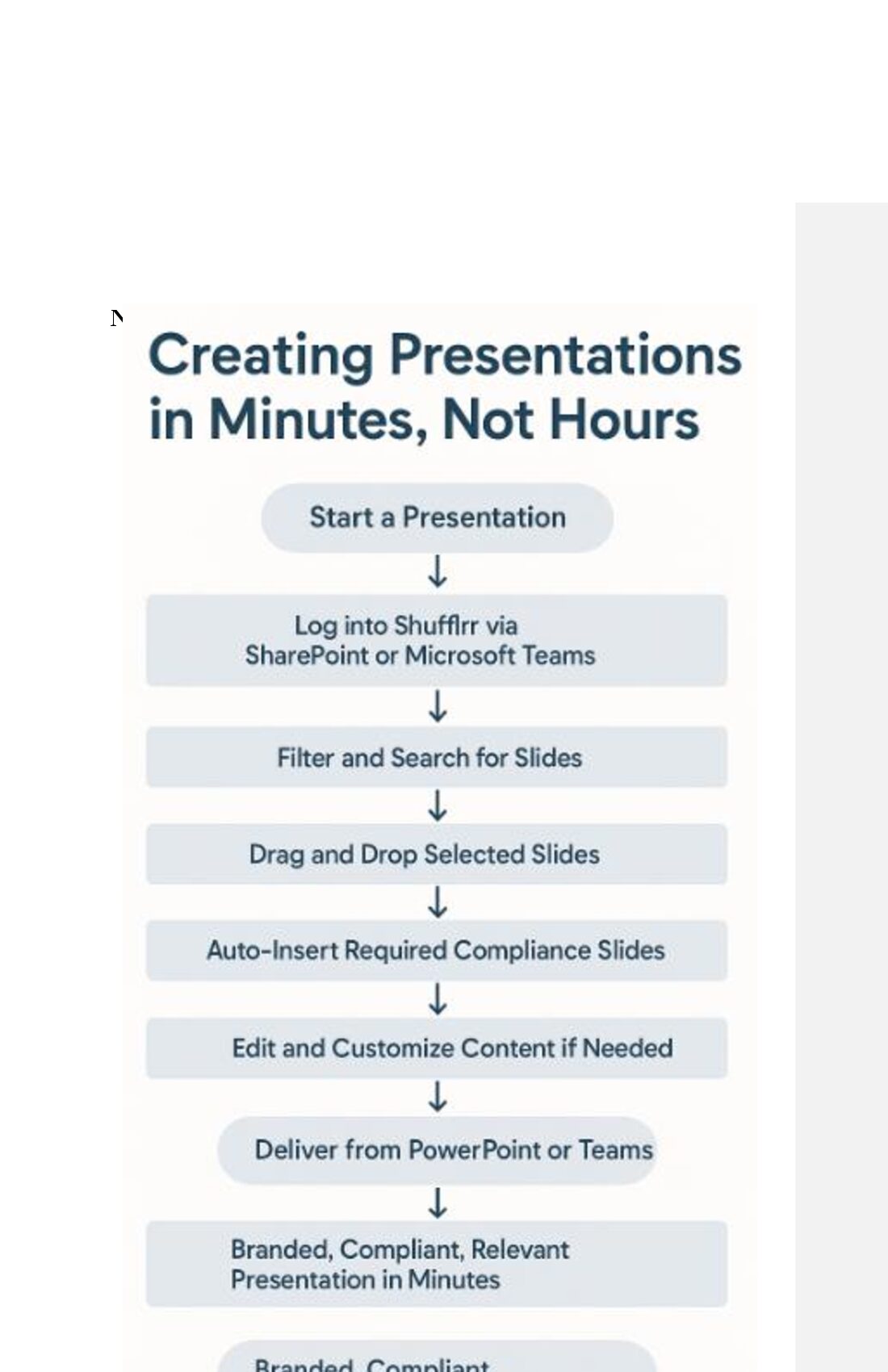
Chapter 6: Creating Presentations in Minutes,
Not Hours One of the most transformative outcomes of presentation management is the drastic reduction in time required to create customized, professional presentations. When enterprise slide content is curated, structured, and accessible, building a new deck becomes less about creation and more about intelligent assembly. This chapter explores how Shufflrr, integrated with SharePoint and Microsoft 365, enables teams to quickly build and deliver impactful presentations—in minutes instead of hours.
We’ll walk through real-world workflows, user experience strategies, and the tools that make “presentation agility” a strategic asset.
The Problem with Traditional Deck Assembly
For many employees—especially in sales, marketing, training, and consulting—building a presentation is a time-consuming chore. The process often looks like this:
- Search for old decks in SharePoint or email threads
- Copy and paste from multiple files
- Format inconsistently styled slides
- Request updated content from marketing
- Rework deck again before delivery
This fragmented workflow wastes hours and creates decks that are often off-brand, inaccurate, or redundant. It’s a poor use of time and talent.
The Shufflrr Difference: Build Once, Assemble Forever
Shufflrr transforms deck creation into a strategic, repeatable process. Its foundation is a central slide library that’s curated, categorized, and accessible to the entire organization. By enabling users to insert slides, insert pre-approved content, and collaborate in real-time, Shufflrr empowers employees to assemble high-quality presentations in minutes.
A Day in the Life: Building a Deck with Shufflrr Scenario: A Sales
Rep Preps for a Client Meeting Goal: Create a custom pitch for a healthcare client within 15 minutes.
Workflow:
- The rep logs into Shufflrr via SharePoint Online.
- She filters for “Healthcare,” “Product Line A,” and “Case Studies.”
- Thumbnails show approved, up-to-date slides categorized by stage.
- She inserts 12 slides into a new presentation tray.
- Mandatory compliance slides auto-insert based on her region and
industry.
- She customizes the title and inserts the client logo.
- The deck is ready—she opens it in PowerPoint or presents via
Teams.
Time Spent: ~10 minutes Outcome:
Branded, compliant, and relevant presentation
Tools That Enable Rapid Assembly
Shufflrr + Microsoft 365 provides an integrated toolkit for speed and precision:
- PowerPoint Add-in Interface
- Visually preview, and sequence slides
- No PowerPoint file-hunting required
- Reduces human error and rework
- Smart Filtering and Search
- Filter by tag, region, content type, or use case
- AI-assisted search (e.g., “demo slides for banking clients”)
- Search across slides, not just decks
- Auto-Insertion of Required Slides
- Legal disclaimers, regional compliance content
- Cannot be removed or altered by end user
- Applied based on metadata rules
- Live Linking and Updates
- Slides linked to master files auto-update across decks
- Edits made by marketing are reflected in real time
- Version control reduces content drift and redundancy
- Templates and Slide Kits
- Branded slide kits for common deck types (pitch, roadmap, QBR)
- Save time with prebuilt outlines
- Ensure visual consistency
Mobile and On-the-Go Presentation Building
Shufflrr’s responsive design supports tablet and browser-based editing, allowing reps and execs to:
- Build decks from hotel rooms, airports, or client lobbies
- Deliver directly from iPads or browsers
- Access slide libraries from mobile-friendly dashboards
This supports agile field teams and executives who often prepare presentations last minute.
Collaborative Presentation Building
With Microsoft
Teams and SharePoint integration, teams can co-create presentations with:
- Comments and approvals
- Slide locking for brand-critical content
- Real-time updates and notifications
Example Use Case:
A product manager in EMEA and a sales rep in the U.S. co-build a launch deck for a global client. Slides are pulled from the same source, tagged appropriately, and customized within their respective regions—all without emailing files back and forth.
The ROI of Speed
Activity Traditional Workflow With Shufflrr
Searching for slides 45 mins 5 mins Assembling deck 90 mins 10 mins Formatting & cleanup 30 mins 0–5 mins Review/Approval loop 60 mins 10–15 mins Total Time Saved ~4.5 hours ~30 mins When multiplied across thousands of employees and hundreds of decks per month, this time savings represents enormous operational efficiency.
Real-World Applications
- Field Sales
- Reps tailor decks by industry, persona, and stage
- Custom decks shared via Teams or as Shufflrr links
- Deck analytics show which content leads to conversions
- Marketing Campaigns
- Launch kits with reusable assets
- Regional teams adapt messaging using approved slides
- Presentation metrics inform future campaign design
- Training and HR
- New hire onboarding decks pulled from training libraries
- Compliance slides auto-applied based on role
- LMS integration possible through SharePoint
- Investor Relations
- Financial and legal slides updated centrally
- IR team pulls updated charts, bios, and performance data
- Executives always present accurate numbers, globally
Advanced Customization Without Risk
Editable Zones vs. Locked Elements
- Shufflrr allows content owners to define which areas of a slide can be
edited.
- Example:
o A product slide may allow description edits o The pricing or compliance disclaimer remains locked
Smart Fields
- Auto-fill fields for client name, rep contact, region, or date
- Personalizes presentations without manual edits
Language Variants
- Slides available in multiple languages
- Regional teams can filter by language tag
- Simplifies global rollout of consistent messaging
Ensuring Compliance Without Slowing Down
Speed should not compromise compliance. Shufflrr solves this by baking compliance into the process:
- Slides tagged by regulation type (e.g., FINRA, HIPAA, GDPR)
- Required slides appear automatically based on region or audience
- Audit logs track who used which content and when
- Legal teams approve content centrally before it’s released
This approach reduces risk and builds trust in regulated industries like finance, healthcare, and pharma.
Predictive Slides™ and AI Assistance (Future Outlook)
Shufflrr’s evolving roadmap includes features that further accelerate deck creation through intelligent automation:
- Predictive Slides™: Suggests next slide based on topic, role, and
user behavior
- AI Slide Builder: Automatically assembles deck drafts from a brief
or meeting context
- Real-time Recommendations: During live conversations or demos,
suggest slides based on keywords spoken or typed This anticipatory content model will make presentations not just fast, but proactive.
Summary: Benefits of Fast, Managed Deck Creation
Benefit Value Delivered
Faster turnaround More time for strategy and client prep Consistency On-brand and compliant every time Reduced support requests Fewer asks to marketing and legal teams Empowered users Reps and teams build decks confidently Better outcomes More targeted, persuasive presentations